REVIEW · AUSTIN
An Exciting Scavenger Hunt: Austin Capitol Sights & Downtown Gems
Book on Viator →Operated by Let's Roam · Bookable on Viator
Downtown Austin turns into a game. This app-led scavenger hunt uses the Let’s Roam mobile app to send you around iconic spots, with puzzles and photo tasks along the way. I like that you can start when you want, and each person gets their own role so the experience doesn’t feel like everyone is doing the same checklist.
I also like the built-in motivation: you’re asked to hunt down answers you can see in person, and you can earn points through texted photo challenges. The route covers a solid chunk of central Austin, so your phone becomes your guide from the Opera House area all the way to the Texas Capitol and back.
One drawback to think about: this is fully dependent on your phone. If you want step-by-step walking directions from a human guide, you may end up doing more guessing than you hoped, and the app can feel fussy for some people.
In This Review
- Key things that make this Austin hunt work
- What this Austin Capitol scavenger hunt really feels like
- Price and value: is $14.99 per person a deal?
- Starting at 1100 Congress Ave and planning your time
- The Let’s Roam app: roles, photo challenges, and what the phone is doing
- The downtown Austin route stop-by-stop (and what to watch for)
- Stop 1: Millett Opera House
- Stop 2: Wooldridge Square
- Stop 3: Texas Governor’s Mansion
- Stop 4: Austin History Center
- Stop 5: Paramount Theatre
- Stop 6: Moonlight Towers
- Stop 7: Bremond Block
- Stop 8: Austin Central Library, Austin Public Library
- Stop 9: Old Bakery & Emporium
- Stop 10: Texas Capitol
- Stop 11: Capitol Complex Visitors Center
- Stop 12: The Contemporary Austin – Jones Center
- Stop 13: Saint Mary Cathedral
- Who this scavenger hunt is best for (and who should skip it)
- The biggest practical gotchas to plan around
- Should you book this Austin Capitol scavenger hunt?
- FAQ
- How long is the Austin Capitol sights and downtown scavenger hunt?
- Where does the scavenger hunt start and end?
- Can I start the hunt at any time?
- What do I get with the ticket price?
- Do I need to download and use a mobile app?
- Is there a minimum age, and are parking or entry tickets included?
Key things that make this Austin hunt work

- Flexible start times: you can begin any time without a live guide waiting on you
- App-led navigation with roles: each participant has different challenges, not one shared script
- Photo tasks for points: you’re actively encouraged to stop, frame shots, and compete a little
- In-person answers: clues are designed to be found on plaques, statues, art, and similar spots
- A concentrated downtown route: Capitol-area icons plus cultural stops in one walkable sweep
- Smartphone-first planning: you’ll need a charged device (and ideally a power bank)
What this Austin Capitol scavenger hunt really feels like
Think of this as a self-guided city game that leans on your curiosity. Instead of passively looking at buildings, you’re asked to locate specific things and respond to questions you can only solve on site. That turns a normal walk into an active hunt, especially if you like the idea of learning a few Austin facts while you’re moving.
The format is also practical: it runs for about 1.5 to 2 hours, and it’s designed so you can fit it into a morning or afternoon without coordinating with a tour guide. You’re not stuck with one group pace, because the app guides you through the tasks and timing.
Still, this is an app experience first. If your phone battery is low, the hunt can feel stressful. If you don’t enjoy trivia-style tasks or photo challenges, the payoff can shrink fast. You’re paying for a game format, not for someone to narrate the city.
Other Texas Capitol and Mt. Bonnell tours in Austin



Price and value: is $14.99 per person a deal?
At $14.99 per person, the value depends on what you want out of downtown Austin. You’re getting Let’s Roam app access and a structured challenge route. If you’ll actually use the app, follow the prompts, and enjoy photo tasks, it can feel like a low-cost way to make a walk more engaging.
If you’re expecting a traditional guided tour, it can be disappointing. This is still a self-guided experience, and the navigation is handled through the phone app rather than a guide who points things out. Also, the pricing is per person, which matters if you’re coming with a group and you expected a single app fee.
My take: it’s a good value for people who like hands-on activities and don’t need someone else to lead them. If you’d rather have clear directions and a live storyteller, put that money toward something guided.
Starting at 1100 Congress Ave and planning your time

The hunt starts at 1100 Congress Ave, Austin, TX 78701, and it ends back at that same point. That’s helpful: you don’t need to plan an odd pickup or figure out transit back to a different spot.
The timing is flexible, but you still need to be realistic. The route includes 13 stops across central Austin, so comfortable walking shoes matter. The activity runs about 2 hours on average, and the hunt itself is typically 1.5 to 2 hours.
A smart approach: start earlier in your day if it’s hot or busy. Check the weather forecast and dress for it—this kind of downtown route doesn’t pause for sweat breaks.
The Let’s Roam app: roles, photo challenges, and what the phone is doing
This experience is “app-led,” which means you’ll download the Let’s Roam app, register, and redeem your ticket there. Once you’re in, the app guides you through the hunt and tells you what to do next.
Two features are especially important:
- Interactive roles: challenges vary by person. That means your group isn’t all reading the same question at the same time.
- Photo challenges for points: you’ll receive texted photo prompts and activities meant for the group to enjoy together.
Also, be prepared for the hunt style. You’re not just reading trivia. The app asks questions designed to be answered by looking at what’s in front of you—plaques, statues, and art details. If you like that kind of scavenger-hunt logic, it feels fun. If you don’t, it can feel like work.
Practical tip: make sure your device is fully charged before you start. The experience explicitly recommends bringing a power bank if you need one. I treat that like a must-have, not an optional extra.
The downtown Austin route stop-by-stop (and what to watch for)
Here’s how the hunt unfolds across central Austin. I’ll keep expectations realistic: because it’s self-guided, your progress depends on following the app prompts and moving between landmarks.
Other quirky Keep Austin Weird experiences in Austin






Stop 1: Millett Opera House
You kick off near a performing-arts landmark, which sets the tone for the game. Early on, expect the app to ease you into how its questions work and how it wants you to look at details you might otherwise skip. If you like finding answers in public spaces, this first stop is a good warm-up.
Potential snag: the first few minutes can be the most confusing if your phone isn’t charged, your app setup isn’t smooth, or your signal is weak.
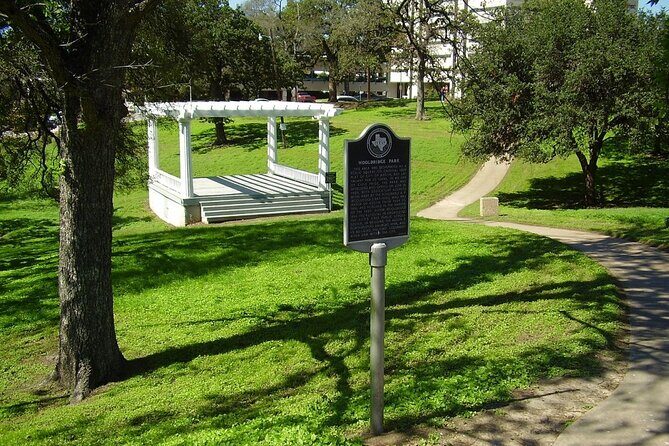
Stop 2: Wooldridge Square
This is the kind of stop where it’s easy to slow down and actually notice what’s around you. Expect prompts tied to something you can see up close—like text on structures or visual elements that the app is pointing you toward indirectly.
The value here is momentum: once you’re moving and answering, the route starts to feel like a true scavenger hunt instead of a long trivia walk.
Stop 3: Texas Governor’s Mansion
You’ll hit a high-profile Austin address area next. Because this hunt is designed around “find it in person” clues, you’ll likely be scanning for specific details in the setting rather than relying on memory. Bring your patience here; it’s not the time to rush.
If you’re with friends, this is a moment where group members can compare what they notice, even if the tasks differ per person.
Stop 4: Austin History Center
This stop leans into the theme of learning while you walk. Since the hunt uses interactive questions, you can expect prompts that push you to read and observe what’s in front of you. It’s a good pause point to slow your pace and focus, especially if you want to actually absorb what you’re looking at.
One practical consideration: if the area is busy, give yourself space and keep an eye on the app so you don’t lose track of the next task.
Stop 5: Paramount Theatre
Cultural landmarks work well for scavenger hunts because they give you lots of visual material. Your photo challenges and text prompts may connect to features you can frame or inspect nearby.
I like this kind of stop because it breaks the “plain walking” feeling. You’re not just crossing streets—you’re looking for specifics.
Stop 6: Moonlight Towers
Now the route starts to feel like a real city loop. A stop like this is perfect for tasks that require you to notice something small or repeatable—like a particular element you can spot and photograph.
If you’re the type who enjoys hunting details, you’ll likely do fine here even without a guide. If you hate guessing, double-check what the app says before you move on.
Stop 7: Bremond Block
This is a “slow down and look” moment. Since the hunt expects you to answer questions found on plaques, statues, and public art, a neighborhood-style stop can give you more chances to spot clues than an obvious single building does.
Also, if you like taking photos, this is where your group can get into the point-scoring vibe—compare framing ideas and keep moving when the app tells you to.
Stop 8: Austin Central Library, Austin Public Library
A library stop is great for a clue-based game because it often encourages close reading. Even if you don’t know anything about the place beforehand, the hunt format is set up so you solve what you need using what you see right there.
Practical note: keep your phone handy and your eyes up. It’s easy to walk by a clue spot when you’re busy taking a scenic photo.
Stop 9: Old Bakery & Emporium
This is your commercial-culture stop, the kind of place where you might naturally want to browse or stop for a snack. But remember: the hunt is time-limited, and food isn’t included.
If you want to get the full value, plan a quick pause for photos and tasks, then get back to the app instructions. You can always add a separate food break after you finish.
Stop 10: Texas Capitol
This is the big-name anchor of the route. Expect your app tasks here to be the most satisfying: high-profile civic landmarks tend to make scavenger hunts more fun because there’s so much to observe.
Also, since the hunt is built around “answers only found in person,” the Capitol area is where you’ll likely feel the smartest rewards for paying attention. Slow down just enough to read and look, not enough to blow your whole schedule.
Stop 11: Capitol Complex Visitors Center
This is a strategic checkpoint. Even in a self-guided hunt, places like a visitors center usually make it easier to orient yourself around the complex. The app may ask you to confirm details using what’s there.
My advice: use this stop to regroup. Check your phone battery, confirm you’re on the right step, and keep the hunt energy up for the final stretch.
Stop 12: The Contemporary Austin – Jones Center
This brings the route into modern culture territory. Photo tasks often work especially well at contemporary art spaces, where the visuals can be more distinctive.
If you enjoy photography, keep your phone at the ready and look for the app’s prompt style—some challenges might require quick framing, others might reward a specific angle or subject.
Stop 13: Saint Mary Cathedral
You finish at a landmark that naturally supports reflective sightseeing. The final stop is where you’ll want to check off remaining app tasks and make sure everyone in your group has completed their role.
If you run a little late, this is still a reasonable closing point because it’s set into the downtown loop and the activity ends back at the start.
Who this scavenger hunt is best for (and who should skip it)
This works best for you if:
- You enjoy scavenger hunts and solving clues in the real world
- You’re comfortable using your smartphone for navigation
- You want a flexible schedule with no guide meeting you at a set time
- Your group likes friendly competition through photo prompts and point scoring
It’s less ideal if:
- You hate app-based navigation or need a person to direct you turn-by-turn
- You expected a classic guided tour narration
- You’re worried about phone battery life and don’t plan to carry a power bank
If you’re traveling with mixed ages, the listing says there’s no minimum age, but you still need moderate physical fitness for a downtown walking route.
The biggest practical gotchas to plan around
I think most frustration here comes from mismatched expectations. This isn’t a guided tour where someone leads you to the next spot. It’s a game where your phone tells you what to do and you follow.
Two things to take seriously:
- Phone readiness: fully charged device, plus a power bank if you can
- App clarity: you may have to interpret prompts and find your own way between points
Also, entrances and attractions aren’t included in the price. If you plan to go inside anywhere, budget time and money separately.
And yes, the negative experience reported for this kind of tour style is usually about complexity and difficulty getting guidance. If you’re the kind of person who wants clear directions without guesswork, test your patience before committing.
Should you book this Austin Capitol scavenger hunt?

Book it if you want a low-cost, flexible way to turn downtown landmarks into an interactive challenge. The best part is the structure: roles, photo prompts, and in-person clues keep the walk from feeling like a standard sightseeing loop.
Skip it if you want a traditional guided experience, clear turn-by-turn instructions, or a mostly passive way to see Austin. Since it’s app-led and self-paced, your enjoyment will rise or fall with how comfortable you feel using your phone to navigate and answer on-site prompts.
If you do decide to go, go prepared: charge your phone, wear comfy shoes, and treat it like a game first. That mindset is what makes it work.
FAQ
How long is the Austin Capitol sights and downtown scavenger hunt?
The hunt runs about 1.5 to 2 hours, with a duration listed at approximately 2 hours.
Where does the scavenger hunt start and end?
It starts at 1100 Congress Ave, Austin, TX 78701, and it ends back at the same meeting point.
Can I start the hunt at any time?
Yes. You can start at any time you wish since it’s a self-guided scavenger hunt using the app.
What do I get with the ticket price?
The included item is access to the Let’s Roam app.
Do I need to download and use a mobile app?
Yes. After purchase, you download the Let’s Roam app, register, and redeem your ticket to begin.
Is there a minimum age, and are parking or entry tickets included?
There is no minimum age listed. Parking and any admission tickets to entrances are not included.